
In Oracle AI Database, annotations provide a powerful way to attach metadata to database objects. Tables, columns, views, and domains are enhanced with self-describing, user-defined assets.
This article introduces annotations and how you can start using them to make your data more explainable and AI-ready.
Database Annotations
Annotations let you attach meaning directly to the database objects themselves. Each annotation has the following general structure, applied to a generic database object:
<object> annotation (key1 'value1', key2 'value2', ...)Create a Table With Annotations
To try it out, let’s create a games table with column and table annotations:
create table games (
    id number generated by default as identity primary key
        annotations (description 'unique identifier for each game'),
    title varchar2(255) not null
        annotations (description 'title of the game', display_name 'Game Title'),
    release_date date
        annotations (description 'release date of the game', display_name 'Release Date'),
    genre varchar2(100)
        annotations (description 'genre of the game', display_name 'Genre', example 'Action, Adventure, RPG')
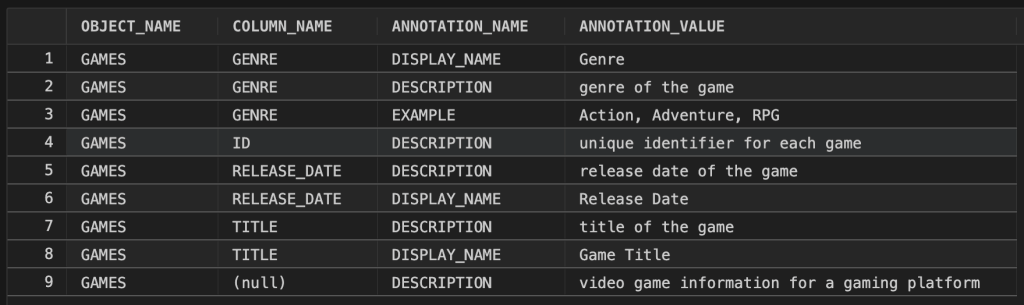
) annotations (description 'video game information for a gaming platform');After creating the table, we can view annotations with the user_annotations_usage view:
select object_name, column_name, annotation_name, annotation_value
from user_annotations_usage
where object_name = 'GAMES'
order by column_name;Which results in the following output:
The DBMS_DEVELOPER PL/SQL package and other tooling can also view annotations.
Update Annotations
Annotations are applied to existing objects using ALTER statements.
Here’s how to alter a table to add a new annotation:
alter table games annotations (use_case 'for analytics and preference insights'); And here’s how to alter a table to add a new column annotation:
-- 'add' keyword is optional!
alter table games modify (id annotations (add visibility 'internal only'));Remove Annotations
To remove an annotation from an existing object, use the DROP keyword before the annotation key:
-- table level
alter table games annotations (drop use_case);
-- column level
alter table games modify (id annotations (drop visibility));Example: Use annotations as context for AI Agents with SQLcl MCP Server
Let’s now use the SQLcl MCP Server to see how annotations can be used to enhance AI output. If you’re not familiar, Model Context Protocol (MCP) is an open-source protocol that exposes data, tools, or services via a standardized interface for large language models (LLMs).

Using a chat client configured with the SQLcl MCP, we can ask a question like “Describe the ‘GAMES’ table using annotation metadata stored in the user_annotations_usage view“.
This is the result I got from Cline with SQLcl MCP and a local Oracle AI Database:
The GAMES table in the local_mcp database connection has the following schema:
- ID: NUMBER (NOT NULL) - Description: unique identifier for each game
- TITLE: VARCHAR2(255) (NOT NULL) - Display Name: Game Title; Description: title of the game
- RELEASE_DATE: DATE - Display Name: Release Date; Description: release date of the game
- GENRE: VARCHAR2(100) - Display Name: Genre; Description: genre of the game; Example: Action, Adventure, RPG

Table-level annotation:
- Description: video game information for a gaming platform
The agent is able to inspect the schema, retrieving additional context from annotations. This metadata is useful for context-aware decisions in agentic workflows!
Annotations allow you add context to your data, evolving schemas to self-explanatory data objects. Tools and AI agents can instantly understand what your data represents, why it exists, and how it should be used.
Leave a Reply