GraphQL became popular for its ability to provide fewer round trips, predictable payloads, and evolving client schemas.
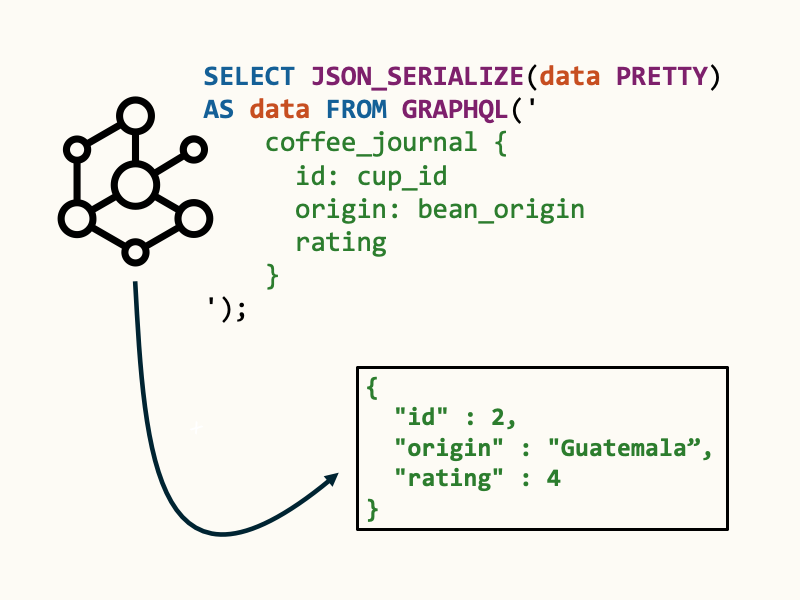
If you run Oracle AI Database, you don’t need a new data store to get those benefits: Using SQL, you can run GraphQL queries on your existing relational schemas.
What is GraphQL?
GraphQL is a query language for APIs and a server-side runtime for executing those queries. Initially created by Facebook, GraphQL offers a more flexible and efficient alternative to traditional REST APIs.
Clients request exactly the data they need, and nothing more: reducing over-fetching, improving performance and overall developer experience.
GraphQL with Oracle SQL
Using an Oracle AI Database and SQL, we can run GraphQL queries using the GraphQL table function. Data from one or more tables is queried using GraphQL syntax, and returned as JSON.
The general format of a GraphQL query in Oracle SQL looks like this:
select * from graphql('<graphql query>')If you’d like pretty-printed JSON back, run a query like this:
-- get name and id from employee table as a JSON doc
SELECT JSON_SERIALIZE(data PRETTY) AS data FROM GRAPHQL('
    employee {
        id: emp_id
        name
}');When we run these GraphQL queries, Oracle joins relational data server-side into a single JSON document which is returned to the client!
Define a relational schema (many-to-many)
To run GraphQL queries, let’s create a schema and insert some data to work with.
We’ll use a many-to-many relationship to model our queries: Here, a student may enroll in one or more courses, and a course may have one or more students.

Run the following SQL to create the tables:
-- Parent tables
CREATE TABLE students (
  student_id   NUMBER GENERATED BY DEFAULT AS IDENTITY PRIMARY KEY,
  first_name   VARCHAR2(50) NOT NULL,
  last_name    VARCHAR2(50) NOT NULL,
  email        VARCHAR2(100) UNIQUE
);

CREATE TABLE courses (
  course_id    NUMBER GENERATED BY DEFAULT AS IDENTITY PRIMARY KEY,
  code         VARCHAR2(20)  NOT NULL UNIQUE,
  title        VARCHAR2(200) NOT NULL
);

-- Junction table (many-to-many)
CREATE TABLE enrollments (
  student_id   NUMBER NOT NULL,
  course_id    NUMBER NOT NULL,
  enrolled_on  DATE   DEFAULT SYSDATE NOT NULL,
  grade        VARCHAR2(2),
  CONSTRAINT pk_enrollments PRIMARY KEY (student_id, course_id),
  CONSTRAINT fk_enrl_student FOREIGN KEY (student_id)
    REFERENCES students(student_id),
  CONSTRAINT fk_enrl_course FOREIGN KEY (course_id)
    REFERENCES courses(course_id)
); Now, we’ll add data so there are two students enrolled in courses. The following script creates two students, two courses, and four corresponding enrollment records:
-- Sample data
INSERT INTO students (first_name, last_name, email)
VALUES ('Alice', 'Smith', 'alice.smith@example.com');
INSERT INTO students (first_name, last_name, email)
VALUES ('Bob', 'Wong', 'bob.wong@example.com');

INSERT INTO courses (code, title) VALUES ('CS101', 'Intro to CS');
INSERT INTO courses (code, title) VALUES ('MATH201', 'Linear Algebra');

-- Link students to courses (many-to-many)
INSERT INTO enrollments (student_id, course_id)
SELECT s.student_id, c.course_id
FROM students s CROSS JOIN courses c
WHERE s.email IN ('alice.smith@example.com', 'bob.wong@example.com')
AND c.code IN ('CS101', 'MATH201'); Query with GraphQL()
Once the tables are populated, we can query the data using GraphQL. Using a filter specification by student name, we can fetch a student and their enrolled courses:
select * from graphql('
    students (firstName: "Alice") {
    _id : student_id
    firstName : first_name
    lastName : last_name
    email
    enrollments @link (to : [STUDENT_ID]) {
        studentId : student_id
        courseId : course_id
        enrolledOn : enrolled_on
        grade
        courses @link (from : [COURSE_ID]) {
            courseId : course_id
            code
            title
        }
    }
}');The resulting JSON document looks like this:
{
	"_id": 1,
	"firstName": "Alice",
	"lastName": "Smith",
	"email": "alice.smith@example.com",
	"enrollments": [
		{
			"studentId": 1,
			"courseId": 1,
			"enrolledOn": "2026-01-07T21:18:26",
			"grade": null,
			"courses": {
				"courseId": 1,
				"code": "CS101",
				"title": "Intro to CS"
			}
		},
		{
			"studentId": 1,
			"courseId": 2,
			"enrolledOn": "2026-01-07T21:18:26",
			"grade": null,
			"courses": {
				"courseId": 2,
				"code": "MATH201",
				"title": "Linear Algebra"
			}
		}
	]
}Let’s try a GraphQL directive like @WHERE, returning only students with first_name = 'Bob':
select * from graphql('
    students @where(sql: "first_name = ''Bob''") {
    _id : student_id
    firstName : first_name
    lastName : last_name

}');Additional directives like @FLEX, @NEST, @ARRAY, and others are also supported for rich querying.
Oracle GraphQL also supports variables, filter query-by-example (QBE), and more. See the Oracle GraphQL query documentation for the full list of query options.
What about JSON Relational Duality?
The GraphQL() query defines the exact shape of the data you want at request time, much like how you define a JSON Relational Duality View to shape relational data into a JSON document.
The key difference is that duality views are persistent database objects. They live in the schema, benefit from database security and governance, and provide a stable contract that apps can reuse.
Use duality views when you need a durable, secure, shareable projection. Use GraphQL when clients need flexible, ad‑hoc selections tailored per request, selections that still map back to the same relational data.
A duality view for the students-enrollments-courses relationship could look like this:
CREATE OR REPLACE FORCE EDITIONABLE JSON RELATIONAL DUALITY VIEW students_dv
 AS students {
    _id : student_id
    firstName : first_name
    lastName : last_name
    email
    enrollments @link (to : [STUDENT_ID]) {
        studentId : student_id
        courseId : course_id
        enrolledOn : enrolled_on
        grade
        courses @link (from : [COURSE_ID]) {
            courseId : course_id
            code
            title
        }
    }
};Which produces JSON like this when queried:
SELECT JSON_SERIALIZE(data PRETTY) AS data FROM students_dv;{
"_id" : 1,
"_metadata" :
{
"etag" : "C7C2FAF1B80A9DDF1887AC4E41308DE5",
"asof" : "00000000006B5510"
},
"firstName" : "Alice",
"lastName" : "Smith",
"email" : "alice.smith@example.comas ",
"enrollments" :
[
{
"studentId" : 1,
"courseId" : 1,
"enrolledOn" : "2026-01-07T21:18:26",
"grade" : null,
"courses" :
{
"courseId" : 1,
"code" : "CS101",
"title" : "Intro to CS"
}
},
{
"studentId" : 1,
"courseId" : 2,
"enrolledOn" : "2026-01-07T21:18:26",
"grade" : null,
"courses" :
{
"courseId" : 2,
"code" : "MATH201",
"title" : "Linear Algebra"
}
}
]
}The view remains present in the database, and can be granted to users in the schema as needed. One of the neat features of duality views is that they can be made read‑write (updatable) subject to view rules and constraints
Check out these two articles for more reading on JSON Relational Duality Views:
See also GraphQL with ORDS for a full Oracle AI Database GraphQL server.
Summary
Combining relational capabilities with modern technologies like GraphQL and JSON Relational Duality, you can deliver agile, performant APIs that preserve data integrity, security, and normalization. This approach unlocks the potential for building next-gen apps using the schemas you already have in your database.
Leave a Reply