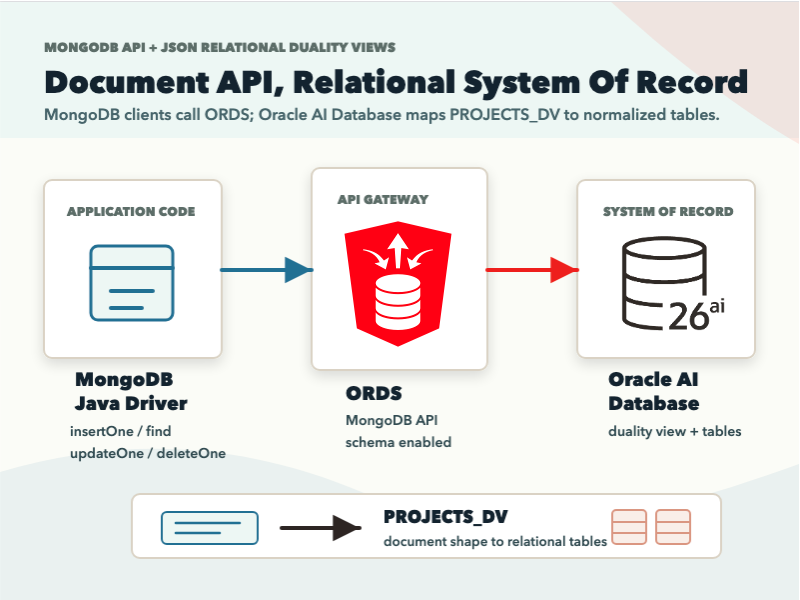
Can your MongoDB client be used against a document-shaped contract while the system of record stays relational?
JSON Relational Duality Views expose document APIs over relational data. Those same document APIs accessed through Oracle REST Data Services’ (ORDS) MongoDB-compatible API allow any MongoDB client to work with what is essentially transactional, relational data.
In this article, we’ll implement exactly that, walking through the json/mongodb-duality-views sample on GitHub.
We’ll create relational tables in an Oracle AI Database Free container, expose them through a JSON Relational Duality View, and then run client operations with the mongodb-sync Java driver.
If you have a Docker-compatible environment and Java+Maven, you can run this on your laptop for free.

Try it yourself
First, clone the sample here: https://github.com/anders-swanson/oracle-database-code-samples/tree/main/json/mongodb-duality-views
Then, download the Oracle AI Database Free container image:
docker pull gvenzl/oracle-free:23.26.1-slim-faststartAnd run the test module from the repository root:
mvn -pl json/mongodb-duality-views -am testThe Maven command runs the MongoDbDualityViewsTest.java test class. The test starts Oracle AI Database Free, run a schema setup script (init.sql), starts ORDS, connects with the MongoDB Java driver, and runs operations on the PROJECTS_DV collection.
Starting with Relational
Let’s dig into the sample, starting with the relational schema. We define two normal relational tables using Oracle SQL (init.sql):
CREATE TABLE projects (
    project_id NUMBER PRIMARY KEY,
    name VARCHAR2(100) NOT NULL,
    status VARCHAR2(30) NOT NULL,
    owner_name VARCHAR2(100) NOT NULL
);

CREATE TABLE project_tasks (
    task_id NUMBER PRIMARY KEY,
    project_id NUMBER NOT NULL,
    title VARCHAR2(200) NOT NULL,
    status VARCHAR2(30) NOT NULL,
    priority NUMBER NOT NULL,
    CONSTRAINT fk_project_tasks_project
        FOREIGN KEY (project_id) REFERENCES projects(project_id)
        ON DELETE CASCADE
);The database model has keys, required fields, a parent-child relationship, and cascading deletes. The document API does not replace those constraints; it’s augmented by them.
We then layer a JSON Relational Duality View document contract over the tables:
CREATE OR REPLACE FORCE EDITIONABLE JSON RELATIONAL DUALITY VIEW projects_dv AS
projects @insert @update @delete {
    _id : project_id
    name
    status
    owner : owner_name
    tasks : project_tasks @insert @update @delete
        [ {
            _id : task_id
            title
            status
            priority
        } ]
}
/Oracle’s JSON Relational Duality View docs describe this as a mapping between table data and JSON documents: the data is stored in relational tables, while applications can read and write document-shaped data through the view.
In this sample, we combine projects and project_tasks into a nested, related JSON document with read/write capabilities:

ORDS Turns The View Into A MongoDB Collection
The next piece is ORDS.
The reusable OrdsContainer Testcontainers extension starts Oracle REST Data Services connected to the database container. ORDS is configured for the projectuser schema (MongoDbDualityViewsTest.java):
private static final OrdsContainer ordsContainer = new OrdsContainer()
        .withNetwork(NETWORK)
        .withDatabaseConnectionString("jdbc:oracle:thin:@ordsdb:1521/freepdb1")
        .withOraclePassword(ADMIN_PASSWORD)
.withSchema(PROJECT_USERNAME, PROJECT_PASSWORD, "ordsdb:1521/freepdb1");The MongoDB API is exposed through ORDS. The Oracle Database API for MongoDB doc explains the basic model: MongoDB clients send commands over the MongoDB wire protocol, and the API translates those commands into SQL statements executed against the database.
The test uses MongoDB connection string shape, with the local ORDS MongoDB API port supplied by the container:
ConnectionString connectionString = new ConnectionString(
        "mongodb://%s:%s@%s:%d/%s?authMechanism=PLAIN&authSource=%%24external&tls=true&retryWrites=false&loadBalanced=true"
                .formatted(
                        PROJECT_USERNAME,
                        PROJECT_PASSWORD,
                        ordsContainer.getHost(),
                        ordsContainer.getMongoDbApiPort(),
                        PROJECT_USERNAME
                )
);The local test uses an insecure TLS context because the container endpoint is disposable. In a real environment, use strict TLS, and strong credentials, schema grants, ORDS configuration + strict network access.
Java Code Uses Document APIs: No OJDBC Driver
The client code looks a lot MongoDB client code (MongoDbDualityViewsTest.java):
MongoDatabase database = client.getDatabase(PROJECT_USERNAME);
MongoCollection<Document> projects = database.getCollection(PROJECTS_COLLECTION);That’s because we’re using the MongoDB Java driver. There’s actually no runtime Java dependency on Oracle AI Database drivers in this sample.
We can build a Document in the shape of the PROJECTS_DV duality view, and then insert it into the collection: (MongoDbDualityViewsTest.java):
Document project = new Document("_id", 1001)
        .append("name", "MongoDB API Duality View")
        .append("status", "active")
        .append("owner", "Demo Team")
        .append("tasks", List.of(
                new Document("_id", 2001)
                        .append("title", "Create relational schema")
                        .append("status", "done")
                        .append("priority", 1),
                new Document("_id", 2002)
                        .append("title", "Exercise duality view collection")
                        .append("status", "in_progress")
                        .append("priority", 2)
        ));

projects.insertOne(project);

Document insertedProject = projects.find(Filters.eq("_id", 1001)).first();
assertEquals("MongoDB API Duality View", insertedProject.getString("name"));
assertEquals("Demo Team", insertedProject.getString("owner"));
Update and delete paths are similar:
projects.updateOne(
        Filters.eq("_id", 1001),
        Updates.set("status", "complete")
);

projects.deleteOne(Filters.eq("_id", 1001));The client code doesn’t invoke JDBC, it’s not constructing SQL.: It is using the MongoDB Java driver against a collection name, and the collection is backed by a duality view over relational tables.

What This Pattern Is Good For
I would use this pattern when the database should remain the system of record, but a document-shaped API is the cleaner boundary for application code.
The sample is especially useful when:
- a team already has MongoDB driver experience
- the application wants nested project-style documents
- the data still benefits from relational constraints and SQL access
- integration tests need to prove ORDS and MongoDB client compatibility together
- the team wants a document contract without duplicating data into a separate store
Always Verify with Real Applications
Before using this in a real application, I would test the exact MongoDB behavior the application depends on:
- query operators and projections
- update operators on nested fields
- index behavior and query plans
- transaction expectations
- generated
_idbehavior - connection pooling and TLS configuration
- ORDS operational ownership
- failure modes during restarts and schema changes
This sample makes a simple first proof cheap enough that you can decide what to test next.
Why it’s More Interesting Than “Just a Compatibility Demo”
What I think is the most interesting part of this demo is that your data can have more than one useful shape:
- relational tables for integrity, constraints, SQL, and shared database work
- JSON documents for application code that wants aggregate-shaped payloads
JSON Relational Duality Views provide the document APIs for relational, and ORDS gives MongoDB clients a way to interact with them.
Leave a Reply