Sometimes we don’t need the most powerful frontier model. Sometimes we just need a local model that’s good enough. Depending on the agent harness, local models are also great for data privacy!
In this article, we’ll use Ollama to install and use gpt-oss:20b for local inference and agent workloads.
Install Ollama
Ollama is easy to install on most platforms. Simply visit the Downloads page and select the installation package of your choice.
Or, if you like to run arbitrary shell scripts, use their install script.
MacOS/Linux:
curl -fsSL https://ollama.com/install.sh | shWindows:
irm https://ollama.com/install.ps1 | iexThis installs not only the desktop app, but the ollama CLI as well. We’ll be using the CLI for the rest of this article.
Pull a local model
Once Ollama is installed, it’s time to select a local model. We’ll use gpt-oss:20b, as it’s a capable model that can run on most laptops. At minimum, about 16GB RAM or VRAM is required to run this model (more is better).
Let’s pull the model with the Ollama CLI:
ollama pull gpt-oss:20b
Launch your coding agent with the local model
Once the model is downloaded, it’s time to run it with the coding agent of your choice. I personally use Codex, but this command works with Claude or whichever tool you’re most comfortable using:
ollama launch codex --model gpt-oss:20bIf you’re using Claude, just replace launch codex with launch claude in the command above.
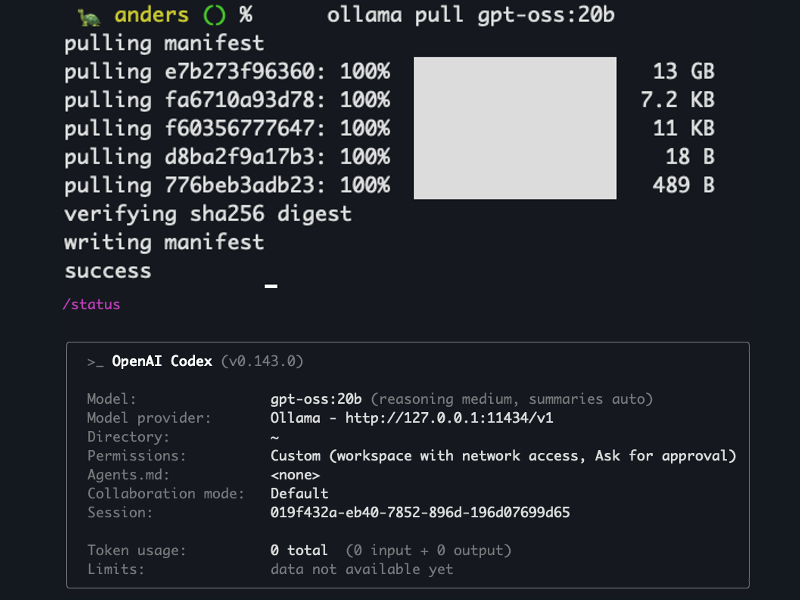
Use /status or a similar command to verify you’re using the local model. Here we can see Codex is connected to Ollama over localhost, using gpt-oss:20b:

Try a test query and you’re off to the races:

That’s it! Ollama makes it exceptionally easy to run the local model of your choice.
When would I use this?
If you’re concerned with frontier model token cost and data privacy, local models are an excellent choice.
However, performance is often constrained. To get comparable performance on reasoning quality, tool use, and tokens per second (TPS), a significant hardware investment is required. While still useful, the models that can run on your laptop will be significantly “dumber” and have slower TPS than a hosted model.
The good news is that this is expected to continuously improve. Models get more capable every day, and self-hosting is becoming easier and easier. If you’re interested in data privacy, I’d keep watching this space.
Leave a Reply