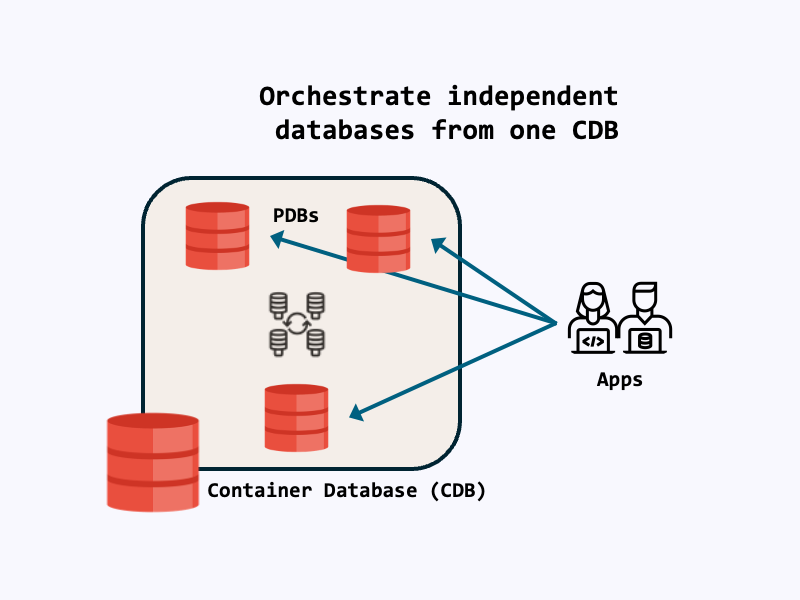
PDBs give microservices their own isolated database environment inside one database instance, reducing blast radius, simplifying lifecycle ops, and enabling hard resource controls.
This solves the problem of what services need from the database layer:
- Strong isolation (workload, security, transactions)
- Independent lifecycle (patch, clone, refresh, move, deploy)
- Predictable performance and resource controls
- Simple connectivity and access, with optional cross-PDB traffic
PDBs function like application containers, enabling several independent databases to run on one host without interfering with each other.
Let’s now walk through configuring a PDB for a sample microservice. This guide assumes you have a running Oracle AI Database instance with at least one CDB (Container Database) available. Bring your own database or follow along with Oracle AI Database Free.
Login to your database
Using SQLcl or SQL*Plus, login to your database server with a privileged user:
sqlplus / as sysdbaConnecting as SYSDBA (or with equivalent privileges) is recommended for PDB management.
Create a PDB
To create a PDB, we use the CREATE PLUGGABLE DATABASE statement. Here, we create the PDB mypdb with an initial admin user pdbadmin:
CREATE PLUGGABLE DATABASE mypdb ADMIN USER pdbadmin IDENTIFIED BY testpwd;If you receive the error “ORA-65016: FILE_NAME_CONVERT must be specified”, this means Oracle Managed Files is disabled on your distribution and the FILE_NAME_CONVERT parameter should be specified for an existing PDB seed.
Here’s how to do this for the Oracle AI Database Free, using the FREE CDB’s PDB seed:
CREATE PLUGGABLE DATABASE mypdb
  ADMIN USER pdbadmin IDENTIFIED BY testpwd
FILE_NAME_CONVERT=('pdbseed', 'mypdb');When you create a CDB, A PDB seed is automatically created. If you don’t know your CDB’s PDB seed, run the following query:
select name from gv$datafile where con_id in (select con_id from gv$pdbs where name='PDB$SEED');Then provide the path or PDB seed name as the FILE_NAME_CONVERT mapping:
CREATE PLUGGABLE DATABASE mypdb
  ADMIN USER pdbadmin IDENTIFIED BY testpwd
  FILE_NAME_CONVERT=(
    '/opt/oracle/oradata/FREE/pdbseed/',
    '/opt/oracle/oradata/FREE/mypdb/'
);Using the PDB container
First, OPEN the PDB for read/write:
ALTER PLUGGABLE DATABASE mypdb OPEN;
-- So the PDB opens automatically after CDB restart
ALTER PLUGGABLE DATABASE mypdb SAVE STATE; Then, change session container to the new PDB:
alter session set container = mypdb;If you need to switch back to the CDB root, set the session container to CDB$ROOT:
alter session set container = CDB$ROOT;Let’s create an example user/schema for within the PDB. You can optionally create tablespaces for this user too:
-- create a USERS tablespace
ALTER SYSTEM SET db_create_file_dest='/opt/oracle/oradata/FREE/mypdb' SCOPE=BOTH;
CREATE TABLESPACE USERS
  DATAFILE SIZE 200M AUTOEXTEND ON NEXT 50M MAXSIZE UNLIMITED
  EXTENT MANAGEMENT LOCAL SEGMENT SPACE MANAGEMENT AUTO;

-- then, create the user:
CREATE USER myapp IDENTIFIED BY "UseAStrong#Passw0rd!"
  DEFAULT TABLESPACE USERS
  TEMPORARY TABLESPACE TEMP
  QUOTA UNLIMITED ON USERS;
-- assign permissions as needed
GRANT CREATE SESSION, CREATE TABLE TO myapp;

-- create a table for the user:
create table myapp.student (
    id         raw(16) default sys_guid() primary key,
    first_name varchar2(50) not null,
    last_name  varchar2(50) not null,
    email      varchar2(100),
    major      varchar2(20) not null,
    credits    number(10),
    gpa        number(3,2) check (gpa between 0.00 and 4.00)
);You can now login to the PDB with the new user:
sql 'myapp/UseAStrong#Passw0rd!@localhost/mypdb'You now have an isolated environment for your app that you can clone, move, use, and monitor independently of other database components!
Creating a PDB with clauses
Create PDBs with clauses that define their storage capacity, logging, recovery, and default tablespace.
Here, we create a PDB with 5 gigabytes of capacity, and a default tablespace with 500 megabytes:
CREATE PLUGGABLE DATABASE testpdb
  ADMIN USER pdbadmin IDENTIFIED BY "Welcome12345!"
  STORAGE (MAXSIZE 5G) -- max PDB size
  DEFAULT TABLESPACE app -- default tablespace of 500 megabytes
  DATAFILE '/opt/oracle/oradata/FREE/testpdb/app01.dbf' SIZE 500M
  AUTOEXTEND ON
  FILE_NAME_CONVERT=(
    '/opt/oracle/oradata/FREE/pdbseed/',
    '/opt/oracle/oradata/FREE/testpdb/'
);The CREATE PLUGGABLE DATABASE documentation has a full list of clauses.
Modifying an existing PDB
Existing PDBs can be modified to manage system settings, clauses, tablespace, and more.
For example, from the CDB we can set the PDB to read-only:
-- if the PDB is already open, we must close it to change the state
ALTER PLUGGABLE DATABASE mypdb CLOSE IMMEDIATE;
-- reopen as read-only
ALTER PLUGGABLE DATABASE mypdb OPEN HYBRID READ ONLY;From within the PDB, we can alter database system settings. For example, changing the number of open database cursors:
ALTER SYSTEM SET open_cursors = 500 SCOPE=BOTH;You can configure many database system settings from a PDB – see Administering a PDB for more information. You may also use resource plans to manage CPU and memory within the PDB, though this requires its own blog post!
Summary
PDBs help microservices, offering strong isolation, predictable performance, and streamlined operations that makes them a pragmatic default for Oracle-powered services.
- Fully isolated database environment inside one database instance with clean boundaries for schema, transactions, and security with lower operational overhead than many standalone DBs.
- Resource Manager controls per PDB (CPU, parallelism, memory, I/O) prevent noisy neighbors and deliver predictable performance and cost.
- Lifecycle operations fit microservices: quick clone/refresh, plug/unplug mobility, and CDB-level patching with canary/blue-green patterns.
- Clear routing via per-PDB services improves connection isolation, resilience (Application Continuity), and simple integration with service discovery.
- Strong governance and observability: PDB-scoped auditing, metrics, and AWR/ASH views enable per-service SLOs, showback, and faster triage.
- Security-by-default with lockdown profiles and least-privilege local users helps reduce blast radius and enforce compliance.
- Good fit for independent services and multi-tenant SaaS; avoid heavy cross-service DB calls and enforce resource plans from day one.
Leave a Reply