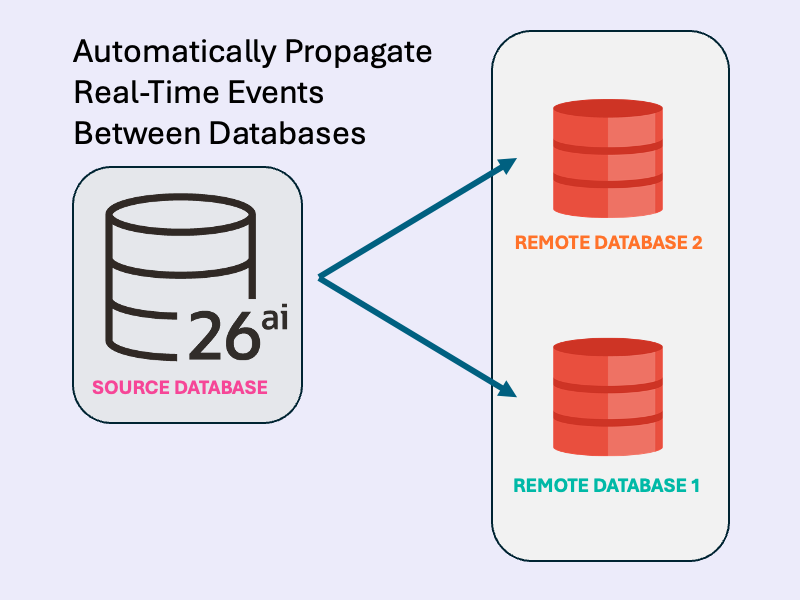
Event-driven apps don’t have to stop at a single database boundary. In this hands-on guide, you’ll use Transactional Event Queues (TxEventQ) in Oracle AI Database to propagate real-time events from one database to another, no external broker required. We’ll spin up two container instances of Oracle AI Database Free, create multi-consumer topics in each database, and schedule cross-database queue-to-queue propagation.
Then we’ll implement a Java producer and consumer to publish messages to the source database topic, watch them replicate over a database link, and see the consumer receive them on the destination database topic.
This pattern works with other languages (PL/SQL, Python, JavaScript) and payload types (JSON, RAW, etc.), but this example keeps it simple with Java and JMS to demonstrate reliable cross-database workflows end-to-end.
Just looking for the code? Skip the article and download the sample from GitHub.
How It Works
- Database Setup: The init scripts create multi-consumer queues (topics) and schedule propagation using
DBMS_AQADM.SCHEDULE_PROPAGATION. Messages are replicated from the source topic to the destination topic via the database link. - Producer: Connects to the source database, reads input from the console, creates JMS text messages with a unique correlation ID, publishes them to the topic, and commits.
- Consumer: Connects to the destination database, creates a durable subscriber, receives and prints messages, and commits.

Dependencies (pom.xml)
- Oracle JDBC and UCP for database connections.
- Oracle AQ Jakarta JMS for messaging.
- Jakarta JMS API.
Prerequisites:
- Docker Compose compatible environment to run database containers
- Java 21+ and Maven 3+: For this example, the event producer and consumer are written in Java
Setup Database Containers
First, download the code from GitHub, which includes the Java application and docker compose script. The txeventq-multidb-replication directory contains the following files:
txeventq-multidb-replication
├── dest_db # Destination database initialization script
│   └── init.sql
├── docker-compose.yml # Docker compose script for 2 DBs
├── pom.xml # Java app POM file for Maven
├── README.md
├── source_db # Source database initialization script
│   └── init.sql
├── src # Java application
│   └── main
│       └── java
│           └── com
│               └── example
│                   └── propagation
│                       ├── DataSourceFactory.java
│                       ├── JMSConsumer.java
│ └── JMSProducer.javaThen, start the sourcedb and destdb databases using docker compose:
docker compose up -dOn container startup, the source_db and dest_db initialization scripts are run on the respective databases. These scripts create users, queues, and setup queue-to-queue replication over a database link from sourcedb to the destdb.
Start the Producer and Consumer
Now, we’ll use the Java application to produce messages to source topic in the sourcedb database, and consume propagated messages from the dest topic in the destdb database.
First, use Maven to compile the Java application. This builds both the Producer and Consumer main classes:
mvn clean compileThen, start the Consumer. The Consumer will automatically start listening for events from the dest topic in the destdb database:
mvn exec:java -Dexec.mainClass="com.example.propagation.JMSConsumer"You should see the following message printed to the console, indicating the Consumer is waiting for messages:
Subscribed to topic 'destuser.dest', waiting for messages...In a separate terminal, start the Producer connected to the sourcedb database:
mvn exec:java -Dexec.mainClass="com.example.propagation.JMSProducer"The Producer prompts for console input. Enter messages, and they will be published to the source topic in the sourcedb database. Messages are automatically propagated to the destination database topic.
Send a few messages with the producer, connected to sourcedb:
Enter message (or 'exit' to quit): my first message
Enter message (or 'exit' to quit): another messageSwitch to the Consumer terminal to see real-time message replication to the dest topic in destdb:
Subscribed to topic 'destuser.dest', waiting for messages...
Received: my first message
Received: another messageYou’ve now successfully propagated real-time events between databases using Transactional Event Queues!
When you’re done, use Ctrl+C to stop each process.
(Optional): Review Propagation Configuration, Producer, and Consumer
In this section, we’ll review the configuration scripts for multi-database event propagation, the Java JMS Producer, and the Java JMS Consumer.
Multi-Database Event Propagation Configuration
The dest_db/init.sql script configures the destdb database like so:
- Create a user
destuserto consume events with all required grants. - Create and start a queue
destuser.destto receive propagated events from sourcedb. Themultiple_consumersparameter must be set totruefor event propagation.
-- Set as appropriate for your database.
alter session set container = freepdb1;
-- queue-to-queue replication uses background processes from the job queue
alter system set job_queue_processes=10;

create user destuser identified by testpwd quota unlimited on users;
grant connect, resource to destuser;

-- Configure destuser with the necessary privileges to use Transactional Event Queues for JMS.
grant aq_administrator_role to destuser;
grant execute on dbms_aq to destuser;
grant execute on dbms_aqadm to destuser;
grant execute on dbms_aqin to destuser;
grant execute on dbms_aqjms to destuser;


begin
    -- create and start the source queue
    dbms_aqadm.create_transactional_event_queue(
        queue_name => 'destuser.dest',
        multiple_consumers => true
    );
    dbms_aqadm.start_queue(
        queue_name => 'destuser.dest'
    );
end;
/The source_db/init.sql script contains the main propagation logic and configures the sourcedb database like so:
- Ensure the
job_queue_processesparameter is set. This is not configured on Oracle AI Database Free, and may need tuning depending on your database. These processes are used by propagation in the background. - Create a user
sourceuserto produce events with all required grants. - Create and start a queue
sourceuser.sourceto publish events. Themultiple_consumersparameter must be set totruefor event propagation. - Create a database link to destdb.
- Begin propagation from
sourceuser.sourcetodestuser.destover the database link.
-- Set as appropriate for your database.
alter session set container = freepdb1;
-- queue-to-queue replication uses background processes from the job queue
alter system set job_queue_processes=10;

create user sourceuser identified by testpwd quota unlimited on users;
grant connect, resource to sourceuser;

-- Configure sourceuser with the necessary privileges to use Transactional Event Queues for JMS.
grant create database link to sourceuser;
grant aq_administrator_role to sourceuser;
grant execute on dbms_aq to sourceuser;
grant execute on dbms_aqadm to sourceuser;
grant execute on dbms_aqin to sourceuser;
grant execute on dbms_aqjms to sourceuser;

begin
    -- create and start the source queue
    dbms_aqadm.create_transactional_event_queue(
        queue_name => 'sourceuser.source',
        multiple_consumers => true
    );
    dbms_aqadm.start_queue(
        queue_name => 'sourceuser.source'
    );
end;
/

-- create a link to database "destdb"
create public database link destdb
    connect to destuser identified by testpwd
    using '(DESCRIPTION=(ADDRESS=(PROTOCOL=TCP)(HOST=destdb)(PORT=1521)) (CONNECT_DATA=(SERVICE_NAME=freepdb1)))';

begin
    -- schedule propagation from the sourceuser.source topic to the destuser.dest@destdb topic over a database link
    dbms_aqadm.schedule_propagation(
            queue_name => 'sourceuser.source',
            destination => 'destdb',
            destination_queue => 'destuser.dest',
            start_time => sysdate, -- immediate start
            duration => null, -- propagate until stopped
            latency  => 0 -- no latency between propagation
    );
end;
/
Java JMS Consumer (destdb)
The JMSConsumer class is configured to automatically connect to the destdb database, starting a JMS consumer from the destuser.dest topic. When started, the Consumer subscribes to the topic and continuously polls for messages until stopped:
package com.example.propagation;

import java.sql.Connection;
import java.sql.PreparedStatement;
import java.sql.SQLException;
import java.util.concurrent.atomic.AtomicInteger;

import jakarta.jms.JMSException;
import jakarta.jms.MessageConsumer;
import jakarta.jms.Session;
import jakarta.jms.Topic;
import jakarta.jms.TopicConnection;
import javax.sql.DataSource;

import oracle.jakarta.jms.AQjmsFactory;
import oracle.jakarta.jms.AQjmsSession;
import oracle.jakarta.jms.AQjmsTextMessage;
import oracle.jdbc.OracleTypes;

public class JMSConsumer implements Runnable {
    private final DataSource dataSource;
    private final String username;
    private final String topicName;
    private final String groupName;

    public static void main(String[] args) {
        final String username = "destuser";
        // connect to the destination database
        DataSource ds = DataSourceFactory.create(username, 1523);
        new JMSConsumer(ds, "destination_grp", username, "dest").run();
    }

    public JMSConsumer(DataSource dataSource, String groupName, String username, String topicName) {
        this.dataSource = dataSource;
        this.username = username;
        this.topicName = topicName;
        this.groupName = groupName;
    }

    @Override
    public void run() {
        // Create a new JMS connection and session.
        try (TopicConnection topicConn = AQjmsFactory.getTopicConnectionFactory(dataSource).createTopicConnection();
             AQjmsSession session = (AQjmsSession) topicConn.createTopicSession(true, Session.AUTO_ACKNOWLEDGE)) {
            Topic jmsTopic = session.getTopic(username, topicName);
            // The JMS Connection must be started before use.
            topicConn.start();
            MessageConsumer consumer = session.createDurableSubscriber(jmsTopic, groupName);

            System.out.printf("Subscribed to topic '%s.%s', waiting for messages...\n", username, topicName);

            while (true) {
                AQjmsTextMessage message = (AQjmsTextMessage) consumer.receive(1_000); // Timeout: 1 second
                if (message != null) {
                    String msg = message.getText();
                    System.out.printf("Received: %s\n", msg);
                    session.commit();  // Only commit if message received and processed successfully
                }
            }
        } catch (JMSException e) {
            System.out.println("Exception caught: " + e);
            throw new RuntimeException(e);
        }
    }
}Java JMS Producer (sourcedb)
The JMSProducer class automatically connects to the sourcedb database and writes console input into the sourceuser.source topic:
package com.example.propagation;

import java.util.UUID;
import java.util.Scanner;

import jakarta.jms.JMSException;
import jakarta.jms.Session;
import jakarta.jms.TextMessage;
import jakarta.jms.Topic;
import jakarta.jms.TopicConnection;
import javax.sql.DataSource;
import oracle.jakarta.jms.AQjmsFactory;
import oracle.jakarta.jms.AQjmsSession;
import oracle.jakarta.jms.AQjmsTopicPublisher;

public class JMSProducer implements Runnable {
    private final DataSource dataSource;
    private final String username;
    private final String topicName;

    public static void main(String[] args) {
        // Connect to the source database
        final String username = "sourceuser";
        DataSource ds = DataSourceFactory.create(username, 1522);
        new JMSProducer(ds, username, "source").run();
    }

    public JMSProducer(DataSource dataSource, String username, String topicName) {
        this.dataSource = dataSource;
        this.username = username;
        this.topicName = topicName;
    }


    @Override
    public void run() {
        // Create a new JMS connection and session.
        try (TopicConnection connection = AQjmsFactory.getTopicConnectionFactory(dataSource).createTopicConnection();
             AQjmsSession session = (AQjmsSession) connection.createTopicSession(true, Session.AUTO_ACKNOWLEDGE)) {

            connection.start();
            Topic jmsTopic = session.getTopic(username, topicName);
            // The JMS Connection must be started before use.
            AQjmsTopicPublisher publisher = (AQjmsTopicPublisher) session.createPublisher(jmsTopic);
            // Read messages from console and send to the topic.
            Scanner scanner = new Scanner(System.in);
            while (true) {
                System.out.print("Enter message (or 'exit' to quit): ");
                String s = scanner.nextLine();
                if (s.equalsIgnoreCase("exit")) {
                    break;
                }
                TextMessage message = session.createTextMessage(s);
                message.setJMSCorrelationID(UUID.randomUUID().toString());
                publisher.publish(message);
                session.commit();
            }
        } catch (JMSException e) {
            System.out.println("JMSException caught: " + e);
            throw new RuntimeException(e);
        }

        System.out.println("[PRODUCER] Closing producer!");
    }
}When each message is received in the topic, automation propagation publishes this event to the destuser.dest topic over the database link.
Leave a Reply