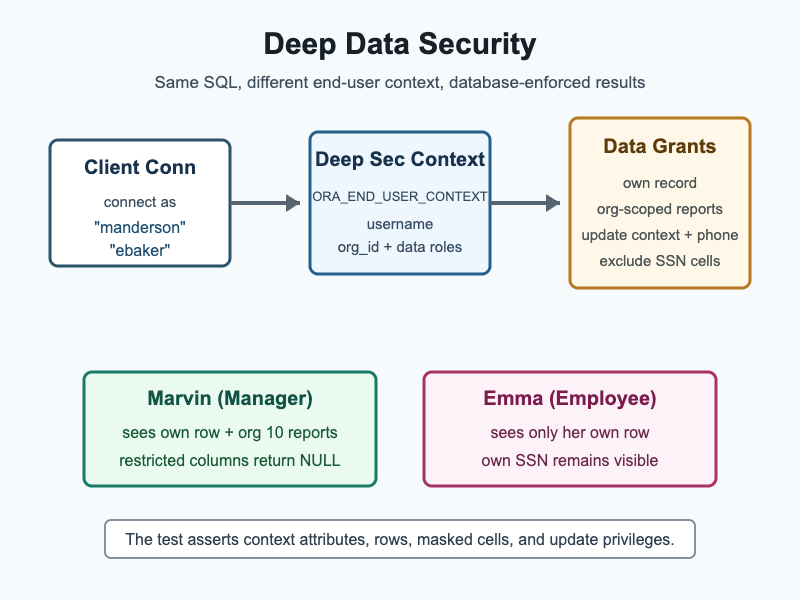
Implementing client-side row and column level RBAC is a fun challenge. But what if you handle everything server-side? That’s exactly the problem Deep Data Security solves for Oracle AI Database.
Deep Data Security in Oracle AI Database is designed so authorization resides in the database, tied to an end user, their data roles, and runtime context. Policies automatically apply security filters, with no client-side intervention.
The use of server-side authorization means applications can let connections access the database as is: no hooking into Hibernate or other framework internals to apply security controls.

This article walks through a small JDBC sample using Deep Data Security and Oracle AI Database Free: loads data grants, connects as two Deep Data Security end users, and asserts the rows, cells, context attributes, and update privileges returned by the same SQL query.
How Policy Enforcement Works
Deep Data Security is enforced by Oracle AI Database, without client-side APIs. Policy-level filters like where email = ? or where manager = ? are applied by the database server.
| End user | Data roles | Expected access |
|---|---|---|
"manderson" | employee_role, manager_role | Marvin sees his own row with SSN, plus Emma and Taylor as direct reports in the default organization with SSN returned as NULL. |
"ebaker" | employee_role | Emma sees only her own row in the default organization, including her own SSN. |
Policy enforcement applies to users and roles. In this sample, we’ll use local end users, which have no schema or database objects:
-- local end users have no schema or database objects
-- and must be granted access to data
create end user "manderson" identified by testpwd;
create end user "ebaker" identified by testpwd;

create data role employee_role;
create data role manager_role;

-- create session is required to connect
create role deepsec_session_role;
grant create session to deepsec_session_role;
grant deepsec_session_role to employee_role;
grant deepsec_session_role to manager_role;

grant data role employee_role to "manderson";
grant data role manager_role to "manderson";
grant data role employee_role to "ebaker";
The employee_own_record grant lets employees read their own row and grants update authorization only for their own phone number. This is an example of both row and column level RBAC driven by database policies:
-- the data grant allows access to an employee's own record
create data grant hr.employees_own_record
    as select, update (phone)
    on hr.employees
    -- row level RBAC
    where email = ORA_END_USER_CONTEXT.username
      and org_id = ORA_END_USER_CONTEXT.hr.hcm_context.org_id
to employee_role;The manager_direct_reports grant allows access to an employee’s direct reports:
-- a manager is allowed access to their direct reports
create data grant hr.manager_direct_reports
    as select (all columns except ssn) -- column level RBAC
    on hr.employees
    where manager = ORA_END_USER_CONTEXT.username
      and org_id = ORA_END_USER_CONTEXT.hr.hcm_context.org_id
to manager_role;Security Context
Deep Data Security policies can evaluate more than the username. The documentation distinguishes the runtime end-user security context, which exists inside a session, from an end-user context definition, which is the database-side template for custom attributes.
The custom end-user context defines session attributes that can participate in data grant predicates:
-- custom deep data security end-user context using a JSON schema
-- essentially, for each session, there is a HR-owned context object with these attributes
-- org_id: if not initialized by the session, set to 10
-- scope: if not initialized by the session, set to WORKFORCE
create end user context hr.hcm_context using json schema '{
    "type": "object",
    "properties": {
        "org_id": {
            "type": "integer",
            "default": 10
        },
        "scope": {
            "type": "string",
            "default": "WORKFORCE"
        }
    }
}';

-- allow end users to read the instantiated context attributes
create data grant hr.hcm_context_read
    as select
       on sys.end_user_context
       where owner = 'HR' and name = 'HCM_CONTEXT'
           to employee_role, manager_role;

-- managers can change the active organization for this session
create data grant hr.hcm_context_manager_update
    as update
           on sys.end_user_context
       where owner = 'HR' and name = 'HCM_CONTEXT'
to manager_role;Assert access
Users can validate their access with ORA_CHECK_DATA_PRIVILEGE and ORA_IS_COLUMN_AUTHORIZED. These boolean checks can be incorporated into a SQL query:
select employee_id,
  first_name,
  last_name,
  email,
  manager,
  org_id,
  ssn,
  salary,
  phone,
  ORA_IS_COLUMN_AUTHORIZED(ssn) as ssn_authorized,
  ORA_CHECK_DATA_PRIVILEGE(emp, 'UPDATE', phone) as can_update_phone
 from hr.employees emp
order by employee_idThe test validates with ORA_CHECK_DATA_PRIVILEGE: Marvin’s own phone cell is updatable, but Emma and Taylor’s phone cells are not updatable through the manager row visibility grant. It also updates Marvin’s hr.hcm_context.org_id through SYS.END_USER_CONTEXT for the current JDBC session and verifies that the same table query moves to his direct report in organization 20.
Require data grants
The setup also runs SET USE DATA GRANTS ONLY ON hr.employees ENABLED so Deep Data Security users must use data grants for the protected table.
-- require data grants for hr.employees
set use data grants only on hr.employees enabled;Run locally
You can run the sample locally.
- Testcontainers starts Oracle AI Database Free.
init.sqlcreateshr.employees, local Deep Data Security end users, data roles, data grants, and a custom end-user context.- The test connects as users
"manderson"and"ebaker". - Both users run the same
select ... from hr.employeesquery. - JUnit checks which rows are visible, which SSN cells are hidden, and which phone cells can be updated.
You can run the test from the project root. The test uses an Oracle AI Database Free container image. A Docker-compatible environment must be running before Maven starts the test:
mvn -pl jdbc-deep-data-security testFAQ
- How does Deep Data Security differ from Oracle Real Application Security (RAS)? RAS requires client-side APIs using the connection object. Deep Data Security automatically manages end-user security context on the database server.
- Do I need to extend frameworks like Hibernate to work with Deep Data Security? No. Deep Data Security works as is with a database connection.
- Is IAM Token auth supported? In an IAM-backed application, the app typically connects with an application or pool identity, then attaches the real end-user identity to the JDBC connection before running SQL. Oracle AI Database validates the tokens, activates the requested Deep Data Security data roles, and exposes the attached attributes through
ORA_END_USER_CONTEXT. For the full IAM setup flow, see Configure Oracle Deep Data Security for Direct Logon with End Users Using IAM.
References
- Code Sample (GitHub)
- What Is Oracle Deep Data Security
- Configure Oracle Deep Data Security for Direct Logon with Local End Users
- Configure Oracle Deep Data Security for Direct Logon with End Users Using IAM
- Data Access Control Configuration
- Configure End-User Contexts and Attributes
- Read End-User Context Attributes
- Modify Custom End-User Context Attributes
- Validate Data Access Control
- About Data Grants
Leave a Reply