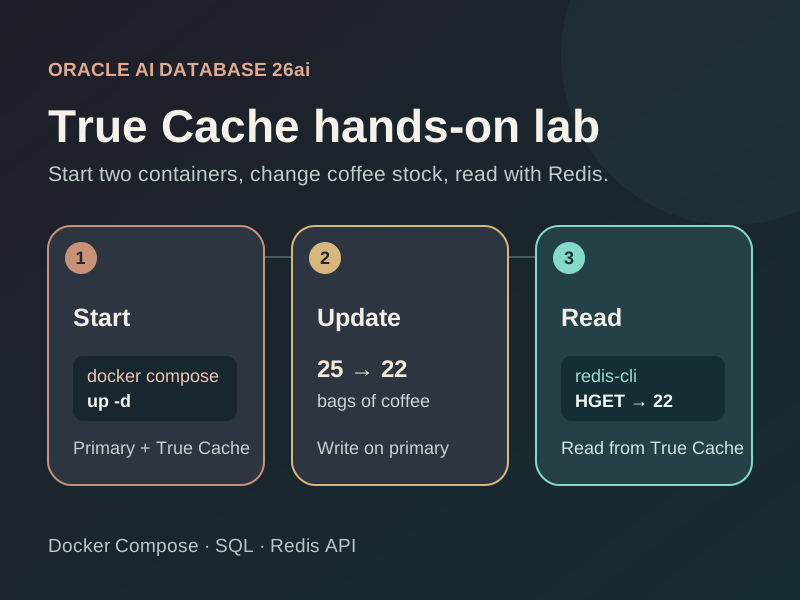
This article demonstrates how to run Oracle True Cache locally with docker-compose for testing, local development, and experimentation. We’ll also enable the True Cache Redis API and verify it with redis-cli.
In the compose script, one container serves as the primary database, while the second is the True Cache read-only replica. Both the primary and True Cache databases use the container-registry.oracle.com/database/free:latest image.
If you’d like to skip the article and jump to the code sample, Start Here. If you like the sample, give the repo a star!
Prerequisites
- Docker and Docker Compose.
- Optional:
redis-clito run the separate Redis API test.
Background: Oracle True Cache
Oracle True Cache is a mostly-diskless, in-memory, read-only cache integrated into Oracle AI Database. True Cache is configured to replicate data from a primary database through redo apply.
Note that True Cache is Oracle AI Database, and is not a separate database/caching platform.

Start the Docker environment
Optionally, set an admin password with the ORACLE_PWD environment variable (defaults to Welcome12345), and then run the compose script:
export ORACLE_PWD='<local-admin-password>'
docker compose up -dYou should see the containers start up like so:

Wait for oracle-free and true-cache containers to become healthy, and for true-cache-configure to exit successfully. That one-shot service registers FREEPDB1_TC on the primary, creates the TRUE_CACHE_DEMO user and demo schema objects there, then configures a TCPS endpoint and Redis dispatcher on True Cache.
On startup, a demo user is created in the FREEPDB1 database with ORACLE_PWD as its password. The exposed database ports are:
- Primary:
localhost:1522/FREEPDB1 - True Cache:
localhost:1523/FREEPDB1_TC - True Cache Redis API:
127.0.0.1:6379(TLS, local certificate)
Verify True Cache replication
Once true-cache is healthy and true-cache-configure has completed, run the test-true-cache.sh script:
./test-true-cache.shThe script adds two records in the primary database, and waits until True Cache replicates the data.
The data is then updated in the primary database, and True Cache is read again to verify the update.
Verify the Redis API
On container startup, the True Cache Redis API is enabled over port 6379, served over TLS with a self-signed certificate. This is a read-only, wire-compatible API for Redis clients to read data from True Cache as if it were a Redis server.
The test-redis-cli.sh script verifies the Redis API against the container setup:
./test-redis-cli.shIt checks for redis-cli before doing any database work, runs the SQL insert, read, update, read test with two new inventory lots, then authenticates over TLS and uses HGET to check both final stock counts through True Cache. It prints the Redis results as a table and exits with an error if the counts do not match.
Run redis-cli directly against the database schema
A simple coffee inventory is created on startup, and populated with data by the test scripts. We can directly connect redis-cli to the True Cache endpoint and query this data.
| Column | Type | Purpose |
|---|---|---|
lot_id | NUMBER | Automatically generated primary key for a coffee lot |
coffee_name | VARCHAR2(100) | Coffee variety |
bags_in_stock | NUMBER(6) | Available bags, never negative |
roasted_on | DATE | Roast date, defaulting to today |
REDISCLI_AUTH="$ORACLE_PWD" redis-cli --tls --insecure \
  -h 127.0.0.1 -p 6379 --user TRUE_CACHE_DEMO \
HGET "true_cache_demo.coffee_inventory:lot_id=1" bags_in_stockNote that the Redis API is read-only. Writes must still be made to the primary database; writes made with a Redis client will fail.
Stop the environment
When you’re done, tear down the docker compose environment:
docker compose downThe databases use container-local storage and are removed with their containers.
Optional: Detailed Redis API Configuration
The true-cache-configure service creates a local self-signed TCPS certificate and adds a PRE=REDIS dispatcher for the FREEPDB1 PDB service on port 6379. The helper also sets SHARED_SERVERS=1, which is required for the dispatcher to accept Redis connections.
The SQL client still uses the FREEPDB1_TC True Cache service. Oracle True Cache authenticates Redis connections as a database user and looks up rows with SQL keys. It does not provide a general Redis key-value store. Commands such as HGET and GET read database rows, while Redis write commands do not update the database. See Oracle’s True Cache Redis Server guide for supported commands and key syntax.
The helper runs read-only bind-mounted SQL*Plus scripts after True Cache starts: primary demo schema setup and cache Redis dispatcher setup.
Oracle Redis Server also works on an Oracle Active Data Guard standby, where it serves read-only standby data while redo apply runs. This is supported starting with Oracle AI Database 26ai Release Update 23.26.3; see Oracle’s Active Data Guard Redis Server documentation.
The Redis test script uses redis-cli --tls --insecure because the local endpoint uses the self-signed certificate. Do not use --insecure for a remotely exposed endpoint.
References
More about True Cache
- For more information on how True Cache works for database read paths, see True Cache: in-memory reads for Oracle AI Database.
- For Java integration tests, Spring Cloud Oracle provides
TrueCacheContainerTestcontainers support for starting a primary and True Cache on a shared Testcontainers network.
Leave a Reply