The code for this article on multi-model database patterns lives in the oracle-database-code-samples repo, under the support-ticket-intelligence sample.
When I add a graph database to an application, I’m not just adding a query feature.
I need to understand how the database is set up, how its schema works, how to operate it, how to monitor it, and how to move data across service boundaries. The same principle applies when I add a vector store, a search engine, or a document database. Each data engine solves real problems, but is yet another system with its own model, failure modes, tooling, telemetry, and synchronization path.
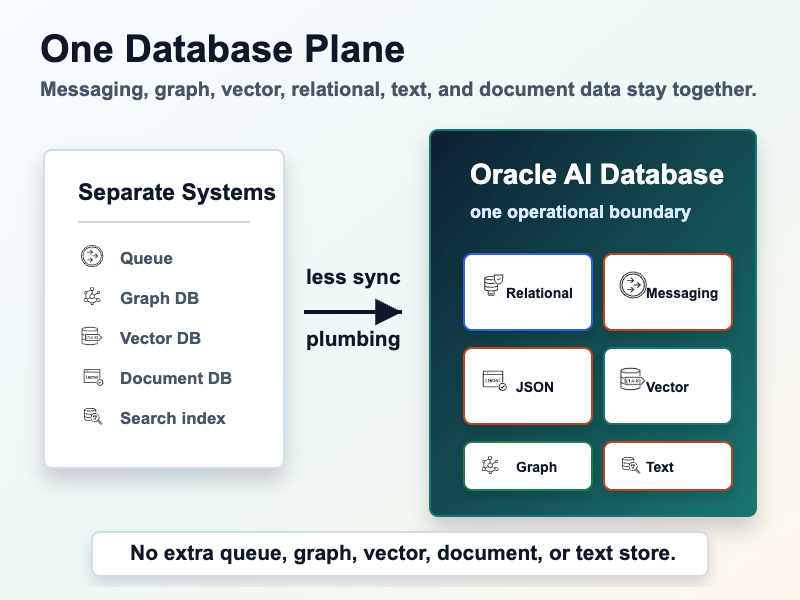
If graph, vector, JSON, text search, relational data, document views, and event topics live in the same database engine, the application does not need a new operational boundary every time the access pattern changes.
This pattern allows transactions to span different data types and database features. A ticket row, a JSON diagnostic payload, a graph edge, and a durable event can commit or roll back together.
If you think your RDBMS is just for handling plain rows and columns, it’s easy to miss what has changed: graph queries, vector search, JSON, full-text search, real-time events, and document-style views. Features that are part of the same database engine, and part of the same transaction boundary.
In this article, we’ll explore the support-ticket-intelligence sample exists to test that argument with code: keep the workflow inside Oracle AI Database and prove it with a Spring Boot integration test.


The code for this article on multi-model database patterns lives in the oracle-database-code-samples repo, under the support-ticket-intelligence sample.
Sample Overview
The app implements a support desk workflow. TicketController.java exposes the REST surface, TicketEventProducer.java owns the transactional write path, SupportTicketWorkflow.java starts the TxEventQ consumer, and TicketSearchService.java handles enrichment and query logic:
- A client opens a ticket through
POST /tickets. - The ticket is stored with relational customer, order, and product references.
- The ticket diagnostics are stored as JSON.
- The same transaction publishes a
TicketOpenedevent through TxEventQ using the Kafka API. - A consumer enriches the ticket by creating text chunks and embeddings.
- Query endpoints expose similar incidents, affected customers and orders, and a document-shaped ticket view.
The schema in schema.sql contains the operational model: customers, products, orders, tickets, runbooks, ticket chunks, and ticket-to-product edges.
- JSON columns for ticket payloads and product diagnostics.
- Oracle Text JSON search indexes for diagnostic and ticket text matching.
- A
VECTOR(384, FLOAT32)column and vector index for semantic ranking. - A SQL property graph for ticket-to-product-to-customer impact traversal.
- A JSON Relational Duality View for document-shaped reads.
The point is that a realistic support workflow often does need more than one data access pattern, and it’s challenging to keep those patterns consistent.
In-database events with an Apache Kafka Java API
In the sample, the ticket row insert, JSON payload, product edge, and event publish happen in one transaction in TicketEventProducer.java. It’s kicked off by a controller entry point:
@PostMapping("/tickets")
TicketResponse openTicket(@RequestBody TicketRequest request) {
    return ticketEventProducer.openTicket(request);
}
If ticket creation fails, the event does not leak out as if the ticket exists. If the transaction commits, the consumer has durable work to pick up.
POST /tickets invokes the producer, starting a transactional messaging workload: inserts the ticket, inserts the graph edge, send a TicketOpened event, and then commit atomically.
OkafkaConfiguration.java wires the producer and consumer as Spring beans. The producer is configured as transactional:
properties.put("enable.idempotence", "true");
properties.put("oracle.transactional.producer", "true");
properties.put("key.serializer", StringSerializer.class.getName());
return new KafkaProducer<>(properties, new StringSerializer(),
serializationFactory.createSerializer());And TicketEventProducer.java uses transactional APIs with a database connection:
producer.beginTransaction();
try {
    Connection connection = producer.getDBConnection();
    long ticketId = createTicket(connection, request);
    publishTicketOpened(ticketId);
    producer.commitTransaction();
    return new TicketResponse(ticketId, "OPEN");
} catch (Exception exception) {
    producer.abortTransaction();
    throw new IllegalStateException("Unable to create support ticket and publish event", exception);
}The key piece is that the event and the ticket are part of the same commit decision, and we can use familiar Kafka Java APIs to send messages through the database.
To consume events, TicketEventConsumer.java polls the topic, calls enrichment on the same database-backed workflow, and commits consumer progress after the batch is processed:
ConsumerRecords<String, TicketOpenedEvent> records =
        consumer.poll(Duration.ofMillis(250));
for (ConsumerRecord<String, TicketOpenedEvent> event : records) {
    ticketSearchService.enrichTicket(consumer.getDBConnection(),
            event.value().ticketId());
}
consumer.commitSync();
Hybrid similarity search for incidents
TicketSearchService.java builds a hybrid query from relational ticket fields, JSON payload values, and product metadata.
VectorService.java creates local MiniLM embeddings, and the schema stores those embeddings in ticket_chunks. Then the search query ranks candidate chunks with VECTOR_DISTANCE, while still applying filters that should stay exact.

The query in TicketSearchService.java finds similar support incidents using a hybrid of relational filters, JSON filtering, Oracle Text, and vector search. The vector score helps rank likely matches, and the database applies filters:
- customer tier must match
- SLA status must match
- product family must match
- SKU must match
- order state must be operationally relevant
- JSON text must contain the error code
with ranked as (
    select t.ticket_id,
           t.subject,
           c.name as customer_name,
           p.name as product_name,
           (1 - vector_distance(tc.embedding, ?, COSINE)) as score,
           score(1) as text_score,
           row_number() over (
               partition by t.ticket_id
               order by vector_distance(tc.embedding, ?, COSINE)
           ) as rn
    from ticket_chunks tc
    join support_tickets t on t.ticket_id = tc.ticket_id
    join customers c on c.customer_id = t.customer_id
    join products p on p.product_id = t.product_id
    join customer_orders o on o.order_id = t.order_id
    where t.ticket_id <> ?
      and c.tier = ?
      and t.sla_status = ?
      and json_value(p.specs, '$.family') = ?
      and json_value(p.specs, '$.sku') = ?
      and o.order_status in ('OPEN', 'SHIPPED')
      and json_textcontains(t.payload, '$', ?, 1)
)
select ticket_id, subject, customer_name, product_name, score, text_score
from ranked
where rn = 1
order by score desc, ticket_id
fetch first 5 rows only

Impact analysis : graph query over relational data
The impact endpoint asks: if this ticket affects a product, who else might be exposed?
Using the graph defined in schema.sql, TicketImpactService.java calls The GRAPH_TABLE operator over customer, product, ticket, order, and ticket-product edge tables used by the rest of the app.
The graph query looks like this, asking the question: Given a support ticket, which customers have orders for the product affected by that ticket?
select customer_name,
       customer_tier,
       order_id,
       order_status,
       product_name
from graph_table (support_ticket_graph
    match
    (ticket is ticket where ticket.ticket_id = ?)
        -[affects is affects]->
    (product is product)
        <-[bought is bought]-
    (customer is customer)
    columns (
        customer.name as customer_name,
        customer.tier as customer_tier,
        bought.order_id as order_id,
        bought.order_status as order_status,
        product.name as product_name
    )
)
order by customer_name, order_idIf Ticket 123 affects Product ABC, the query returns customers who bought ABC, along with their tier and order status.
If you have relationships in your schema, you can use SQL property graphs to give you graph traversal without copying relational data somewhere else first.
Document endpoint : JSON Relational Duality Views
The app exposes a document api at /tickets/{id}/document:
curl "http://localhost:8080/tickets/1/document"The endpoint is implemented in TicketController.java and reads from the tickets_dv JSON Relational Duality View through TicketSearchService.java. The normalized ticket, customer, product, and order rows come back as one nested JSON document.
The sample uses Oracle AI Database to expose the relational data in the shape the API wants, which is particularly useful when you want a document view over relational data:
-- tickets_dv: JSON Relational Duality View that exposes each support ticket as a nested document.
create or replace force editionable json relational duality view tickets_dv as
support_tickets @insert @update @delete {
    _id : ticket_id
    subject
    body
    status
    slaStatus : sla_status
    createdAt : created_at
    diagnostics : payload
    customer : customers {
        _id : customer_id
        name
        tier
        region
    }
    product : products {
        _id : product_id
        name
        specs
    }
    order : customer_orders {
        _id : order_id
        orderStatus : order_status
        openedAt : opened_at
    }
};Run it locally : mvn test
To run the sample, you’ll need Maven, Java 21+, and a docker-compatible environment. From the repository root:
mvn test -pl support-ticket-intelligenceSupportTicketIntelligenceTest.java starts an Oracle AI Database Free container with Testcontainers, initializes the schema and seed data, configures TxEventQ privileges, starts the Spring Boot app, opens a ticket through REST, waits for the event consumer to enrich it, and verifies the workload using the REST query APIs.
The assertions check:
- the created ticket row exists
- the ticket-product graph edge exists
- the ticket consumer created vector chunks
- similarity search returns the expected prior ticket
- graph impact returns affected customers and orders
- the document endpoint returns the nested ticket JSON
When to use the multi-model, “converged” database pattern
The architectural question is simple to ask, but difficult to answer: Do you add more infrastructure, operations, maintenance, and cognitive load, or do you rely on a single vendor?
Multi-model databases (like Oracle AI Database) stand out when you give a workload a single source of truth across multiple data models.
This pattern gives you operational simplicity, strong transaction boundaries, and easy developer data access. The next time you consider splitting a workload across five systems, try using the multi-model database you probably already operate. It could save you time, cost, and real human effort.
References
Want to try some of these features in isolation? Check out these articles for a hands-on look at each database feature used in this example:
- TxEventQ and database-native pub/sub for the eventing and transaction-boundary argument.
- LangChain vs. DIY vector search with Oracle AI Database for the tradeoff between framework-managed vector stores and explicit SQL.
- A vector database primer for the basics behind embeddings, vector distance, and vector indexes.
- Full-text JSON search with Oracle Text for the JSON text-search surface used in similar incident lookup.
- Property graphs with JDBC for the
GRAPH_TABLEimpact-query pattern. - Hands-on JDBC with JSON Relational Duality Views for the document-shaped API pattern over relational tables.
- Testing with Oracle AI Database Free and Testcontainers for the disposable integration-test setup.
How to reach us: https://support.oracle.com/ Product – Oracle Database – Enterprise Edition, Problem Type>Information Integration>Advanced Queuing. Mention TxEventQ in the description.
Leave a Reply